
EFX-500
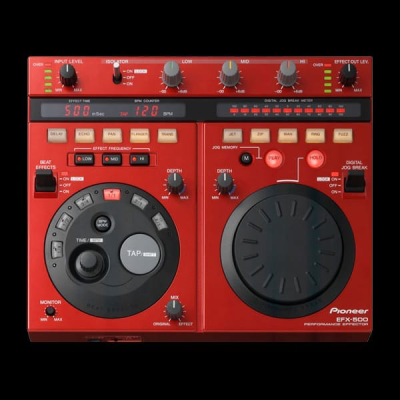
As the maker of the acclaimed DJM-500 mixer with built-in effects, Pioneer has a history in DJ effects units that predates the Kaoss Pad. Similar in scope and intent to the Roland EF-303, Pioneer’s sleek EFX-500 features a 20-bit sampling rate and a 24-bit DSP engine. Its output section includes stereo RCA and 1/4-inch jack inputs and outputs (I/O), as well as MIDI I/O connections. The device, essentially divided into three tiers, features an Isolator unit, a Beat Effect unit, and a Digital Jog Break unit, which boasts a saucer-sized dial for real-time effect parameter modulation.
To start with, the EFX-500 is extremely well designed. It’s very easy and fun to use right out of the box, and its front panel is laid out logically and without confusion. The Beat Effect unit offers five essential effects: Delay, Echo, Pan, Flanger, and Trans (a clever way of saying slicer, it cuts the signal into rhythmic pieces). For each effect, you can select the note value to which it will synchronize: sixteenth note (1/4), eighth note (1/2), dotted eighth note (3/4), quarter note (1/1), half note (2/1), or whole note (4/1). When feeding in a signal, for example, a drum loop, you first set the tempo, either manually (using the Time/BPM knob), via tap tempo (with the Tap button), or automatically (by setting the BPM to Auto using the BPM Mode button).
The delays and echoes sound very, very good, a bit smoother and richer than standard digital sounds. The pans are fluid and well-defined, the flangers are deep without sacrificing too much top-end crispness, and the Trans effects are highly detailed and adjustable. Exploring the Beat Select options provides a wide variety of rhythmic delays, flangers of varying length and depth, and catchy, rhythmic Trans effects; all of these can be fine-tuned using the Depth knob and the Mix knob to adjust the relative level between the effect and the original dry signal. Just like on the EF-303, you can choose to affect only the lows, mids, or highs; unlike the EF-303, the EFX-500 allows you to explore any combination of the three. The EFX-500 features two On switches for effects, similar to the Grab function on the EF-303: a momentary On switch and a Lock On switch allow you to quickly punch effects in and out or leave them active for a longer duration.
-
The high-quality, independent 3-band equalizer (HI, MID, LOW) cuts sounds down to{dB} almost completely silencing the instrument sounds in each frequency band.
-
Both Momentary ON and LOCK ON activation methods are adopted. In the Momentary position, the switch returns to OFF as soon as you release the lever, allowing for very smooth ON-OFF effect transitions. In the LOCK ON position, the switch remains turned on.
-
Press the AUTO BEAT EFFECT buttons (1/4, 1/2, 3/4, 1/1, 2/1, 4/1) to generate live effects, DELAY, ECHO, AUTO PAN, AUTO FLANGER, and AUTO TRANSFORMER, in sync with the pre-defined beat.
With independent 3-band selection (HI, MID, LOW), this unit enables a wider range of performance possibilities than conventional effectors.
Turn the DEPTH and MIX knobs to alter the effect depth and the balance between the original dry sound and the effected wet sound, respectively. Additionally, standard effects can be applied without being linked to the BPM.
You can define the beat using various methods, such as AUTO, TAP, msec, BPM, and MIDI BEAT.EFFECT FREQUENCY
Button operation allows you to freely select specific frequencies across the 3 bands (HI, MID, LOW) to apply effects. You can combine the bands however you like, for example, generating effects only on the mids (MID), or conversely, selecting the lows (LOW) and highs (HI) for effects while keeping the original dry sound on the mids.DELAY: You can set Delay sounds at any tempo.
ECHO: You can set Echo sounds at any tempo. Turning the DEPTH knob to maximum (MAX) produces the HOLD DELAY effect, where the repetition continues even when the BEAT EFFECT is turned off (OFF).
AUTO PAN: You can automatically oscillate the sound between the left and right channels.
AUTO FLANGER: Produces a sound effect similar to the periodic ascent and descent of a jet plane. The DEPTH knob can be used to alter the intensity of the sweep.
AUTO TRANSFORMER: Periodically cuts the sound.
-
This counter automatically measures the BPM (Beats Per Minute) of the track and converts it into a digital display. You can digitally confirm the BPM of incoming music sources.
You can set the BPM instantly by tapping the button with your finger. Press the button twice to enter the tempo as desired. -
The “Digital Jog Break” is equipped to generate fresh digital sounds on the fly. Rotating the JOG DIAL controls 5 effects: JET, ZIP, WAH, RING MODULATION, and FUZZ. The DEPTH knob can be used to freely define the intensity and depth of the effects, as well as the balance between the original dry sound and the effected wet sound.
You can enjoy a variety of DJ performances with the feel of playing an instrument.LEVER SWITCH
Both Momentary ON and LOCK ON activation methods are adopted for smooth ON/OFF transitions.JOG BREAK METER: Optically indicates the movement of the JOG DIAL and the variation in sounds, allowing you to visually confirm the action.
JET: This function adds a SHORT DELAY. Rotating the JOG DIAL creates “wave” sounds, simulating the FLANGER effect obtained when using 2 analog turntables.
ZIP: The JOG DIAL can be used to alter the pitch of the played-back sounds without changing the tempo. Lowering the pitch produces sounds similar to those resulting from slowing down an analog turntable.
WAH: This function changes the cut-off frequency. Rotating the JOG DIAL makes the sound of a specific instrument stronger or weaker, creating the sensation that the sound is moving.
RING MODULATION: Modulating the sounds produces a bell-like tone, delivering effects such as a “cosmic” sound or a robot voice.
FUZZ: This is a distortion effect. The JOG DIAL changes the frequency band undergoing distortion.
HOLD FUNCTION
With this function turned on, the current state can be maintained if you stop rotating the JOG DIAL. With the function turned off, the sound gradually returns to its original state.JOG DIAL MEMORY FUNCTION
This is a new function to memorize and playback the movement of the JOG DIAL. When you rotate the JOG DIAL and press the MEMORY button simultaneously, the movement is memorized for up to 8 seconds. While pressing the PLAY button, you can replay the memorized action across any of the 5 effects as many times as you like.